 Pencilly
How to plan your week from a messy to-do list
To plan your week from a messy to-do list, give each task a time it must happen or a deadline, guess how long it takes, and then place it in a free gap in your real calendar, not an empty one. Review the result before you commit. That takes about ten minutes by hand; the steps below show how, and what Pencilly does for you.
The method
- Dump everything, unsorted. One line per task, in whatever order they come to mind. Sorting now only slows you down.
- Say when, or by when. A task is either fixed ("gym at 6pm") or has a deadline ("send invites by Sunday"). They plan differently: a fixed task is an appointment, a deadline task can go anywhere before the date. Write which one it is.
- Guess how long each takes. A rough guess beats none: 15 minutes for a call, 45 for a gift errand, an hour for the gym. Most plans fail because every task is silently assumed to take no time.
- Look at your real calendar first. Find the gaps between meetings before you place anything. A plan built on an empty week breaks the moment Tuesday's meetings show up.
- Place urgent work first, then the rest. Anything urgent takes the earliest gap. Then earliest deadline, then quick tasks that fill the leftovers. Keep lunch and dinner free and leave a few minutes between blocks.
- Review before you commit. Skim the week once. Move anything that feels wrong, then add it to your calendar. If a task doesn't fit, say so out loud instead of squeezing it in.
Where this goes wrong
- Planning around work hours by guess. If you can't tell which tasks are work and which are personal, keep every task out of your work hours unless nothing else fits.
- Treating "by 3pm" as "at 3pm". One is a deadline, the other an appointment.
- No slack. Back-to-back blocks turn one overrun into a ruined afternoon.
How Pencilly does it
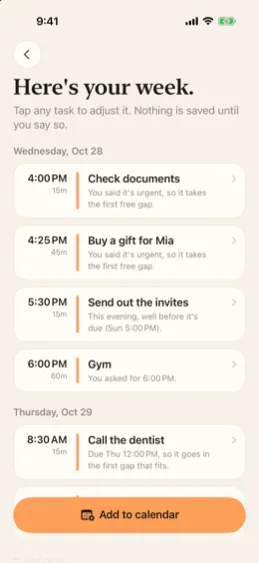
Pencilly follows the same six steps on your iPhone. You type, paste, scan or say your list. It reads every calendar on your phone, finds the free gaps, and puts each task where it fits: urgent ones first, deadlines respected, lunch and dinner kept free, work hours avoided. Each task card has a one-line reason, such as "You said it's urgent, so it takes the first free gap." If something can't fit, Pencilly lists it instead of double-booking you. Nothing goes in your calendar until you tap Add to calendar, and one tap undoes it.
It works with no account and sends nothing off your phone. See what Pencilly does, or read the privacy policy.